ADC0804 Interfacing with 8051 Microcontroller From Rikipedia Embedded Wiki
ADC0804 Pin-out and Typical Connections
As shown in the typical circuit, ADC0804 can be interfaced with any microcontroller. You need a minimum of 11 pins to interface ADC0804, eight for data pins and 3 for control pins. As shown in the typical circuit the chip select pin can be made low if you are not using the microcontroller port for any other peripheral (multiplexing).
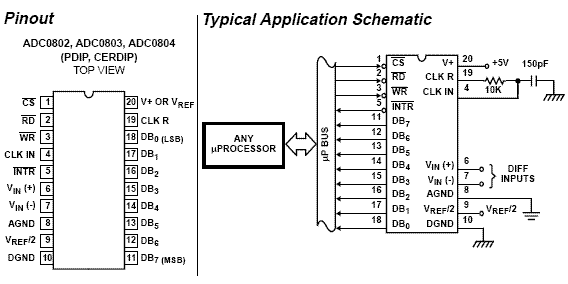
ADC0804 Pin Diagram
There is a universal rule to find out how to use an IC. All you need is the datasheet of the IC you are working with and take a look at the timing diagram of the IC which shows how to send the data, which signal to assert and at what time the signal should be made high or low etc.
Note: Keep this in mind that whenever you are working with an IC and you want to know how to communicate with that IC, then simply look into the timing diagram of that IC from its datasheet. It gives you complete information that you need regarding the communication of IC.
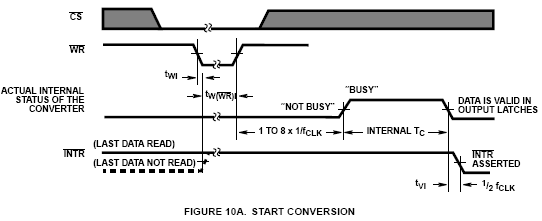
Start Conversion Timing Diagram
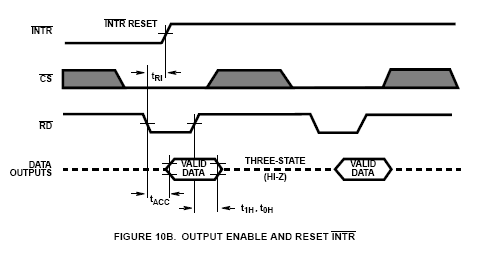
End of Conversion Timing Diagram
The above timing diagrams are from ADC0804 datasheet. The first diagram (FIGURE 10A) shows how to start a conversion. Also you can see which signals are to be asserted and at what time to start a conversion. So looking into the timing diagram FIGURE 10A. We note down the steps or say the order in which signals are to be asserted to start a conversion of ADC. As we have decided to make Chip select pin as low so we need not to bother about the CS signal in the timing diagram. Below steps are for starting an ADC conversion. I am also including CS signal to give you a clear picture. While programming we will not use this signal.
- Make chip select (CS) signal low.
- Make write (WR) signal low.
- Make chip select (CS) high.
- Wait for INTR pin to go low (means conversion ends).
Once the conversion in ADC is done, the data is available in the output latch of the ADC. Looking at the FIGURE 10B which shows the timing diagram of how to read the converted value from the output latch of the ADC. Data of the new conversion is only avalable for reading after ADC0804 made INTR pin low or say when the conversion is over. Below are the stepts to read output from the ADC0804.
- Make chip select (CS) pin low.
- Make read (RD) signal low.
- Read the data from port where ADC is connected.
- Make read (RD) signal high.
- Make chip select (CS) high.
8051 Assembly Program for ADC0804
	rd equ P1.0           ;Read signal P1.0
	wr equ P1.1           ;Write signal P1.1
	cs equ P1.2           ;Chip Select P1.2
	intr equ P1.3         ;INTR signal P1.3

	adc_port equ P2       ;ADC data pins P2
	adc_val equ 30H       ;ADC read value stored here

	org 0H
start:                    ;Start of Program
	acall conv            ;Start ADC conversion
	acall read            ;Read converted value
	mov P3,adc_val        ;Move the value to Port 3
	sjmp start            ;Do it again

conv:                     ;Start of Conversion
	clr cs                ;Make CS low
	clr wr                ;Make WR Low
	nop
	setb wr               ;Make WR High
	setb cs               ;Make CS high
wait:
	jb intr,wait          ;Wait for INTR signal
	ret                   ;Conversion done

read:                     ;Read ADC value
	clr cs                ;Make CS Low
	clr rd                ;Make RD Low
	mov a,adc_port        ;Read the converted value
	mov adc_val,a         ;Store it in local variable
	setb rd               ;Make RD High
	setb cs               ;Make CS High
	ret                   ;Reading done
8051 C program for ADC0804
#include <REGX51.H>
#define adc_port P2              //ADC Port
#define rd P1_0                  //Read signal P1.0
#define wr P1_1                  //Write signal P1.1
#define cs P1_2                  //Chip Select P1.2
#define intr P1_3                //INTR signal P1.3

void conv();                     //Start of conversion function
void read();                     //Read ADC function

unsigned char adc_val;

void main() {
	while (1) {              //Forever loop
		conv();          //Start conversion
		read();          //Read ADC
		P3 = adc_val;    //Send the read value to P3
	}
}

void conv() {
	cs = 0;                  //Make CS low
	wr = 0;                  //Make WR low
	wr = 1;                  //Make WR high
	cs = 1;                  //Make CS high
	while (intr);            //Wait for INTR to go low
}

void read() {
	cs = 0;                  //Make CS low
	rd = 0;                  //Make RD low
	adc_val = adc_port;      //Read ADC port
	rd = 1;                  //Make RD high
	cs = 1;                  //Make CS high
}
Further Reading
- Analog to Digital Converter
- ADC0804 Interfacing with AVR Microcontroller
- ADC0808 Interfacing Tutorial
- ADS1115 ADC Interfacing Tutorial
Help & Queries
If you have any queries, doubts or feedback on this tutorial please share in our discussion forum. If you want us to write tutorial for more devices please let us know in the forum.
